Old links for the Wiki at slackware.com will remain valid because you will automatically be re-routed.
Mirror URL for the Wiki is http://wiki.alienbase.nl/
Hi! I am Eric Hameleers, or Alien BOB as I am called on various Slackware forums & channels. I am a long time Slackware user, part of the Slackware team, but I am not a Slackware employee. You'll find scripts I wrote here, lots of Slackware packages, their build scripts, and several articles I wrote for my Wiki of course.
All of what I make available here is not official Slackware-released software.
Do not bug Pat about what you download from my homepage (other than to tell him he should include my packages in the official Slackware distribution if you like them :-)
What I do like is to get feedback! Visit my blog and tell me what you think.
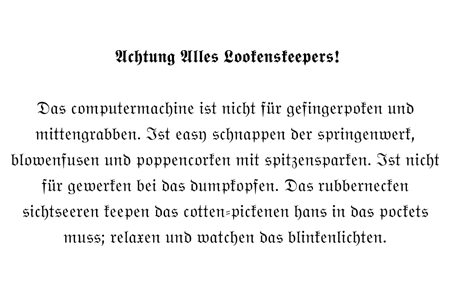
In case you wonder; the above image is a constant reminder to my entry into
the "real world" of computers. This leaflet hung in my room when I started my
first night-time job as application developer / technical sales support.
- My slackbuild repository (RSS feed)
- Some useful scripts I wrote (like the infamous mirror-slackware-current.sh)
- A set of multilib packages for Slackware64. After installing these on Slackware64, you will be able to run, and compile, 32-bit programs. Read the README before installing!!
- My scripts, patches and instructions to build an image file for the USB equivalent of the bootable Slackware CD/DVD. This installer can fit on a flash key ( also called a pendrive) of 256 MB or bigger - you get more packages on a bigger pendrive.
This is different from Slackware's 'USB installer' in the 'usb-and-pxe-installers' directory. That 'USB installer' uses a small image to boot from a USB stick. It contains no packages and therefore needs to install those from a DVD, CDROM set or NFS server.
My usbinstall scripts on the other hand, create an image which contains Slackware packages as well, so that you no longer need that DVD/CDROM/NFS. Copy the image to a big enough USB stick, and carry it around with you. Install Slackware wherever you want.
- A mini ISO image of about 40MB (I created these for several versions of Slackware) which you can burn to a creditcard-sized CDROM to boot, and install packages from an NFS server or local hard disk.
- My modifications to several of the Slackware rc scripts (rc.inet1* and rc.wireless* specifically)
Some of my work for older versions of Slackware is kept here for historical reasons:
- Scripts that act as DHCP client hooks (custom commands that execute when your IP address changes)
- A patch for the hotplug net.agent script - you need this if you use Slackware 10.1 or older and have problems with wireless and WPA
- A number of alternative installers for Slackware 11.0.
As a bonus when you buy the official CD set of DVD, you will find those also in the directory /miniiso-pxe-usb-installers on the Slackware 11.0 DVD and on CD 5. This directory is not found on official Slackware mirrors.
NOTE: Slackware 12.0 has officially supported USB and PXE installers in the directory /usb-and-pxe-installers so there is no need for me to have copies of them on my own site as well.
Eric Hameleers <alien at slackware dot com>